The Rise of Telemedicine Platforms The Rise of Telemedicine Platforms
Remote IT Infrastructure Management
  • By ACI
  • 16 December, 2025
  • 10 min Read

Understanding the 7 Key Components of IT Infrastructure Management

For business and organizational decision makers, technology infrastructure is no longer a background utility. It is a core operational asset that affects continuity, security, customer experience, and long term growth. As organizations expand across locations, adopt cloud services, and automate business processes, the need for disciplined IT infrastructure management becomes unavoidable.

IT infrastructure management refers to the coordinated oversight of hardware, software, networks, data, cloud environments, security controls, and the people and processes that keep these elements reliable. When managed well, infrastructure supports strategic objectives. When neglected, it introduces risk, downtime, and cost uncertainty.

This article explains the seven key components of IT infrastructure management, how they work together, and why the role of IT infrastructure management is central to modern enterprises. It also outlines how organizations are using automation and AI in IT infrastructure management to improve visibility, resilience, and decision making.

What IT Infrastructure Management Means for Modern Organizations

IT infrastructure management is the practice of maintaining and optimizing the systems that run daily operations. It goes beyond basic technical support. It includes planning, governance, monitoring, security, and continuous improvement across the entire technology stack.

For decision makers, effective IT infrastructure management delivers three outcomes. Stability through consistent system availability. Security through controlled access and risk reduction. Agility through scalable platforms that support new initiatives without disruption.

Without a structured approach, infrastructure becomes fragmented. Teams rely on reactive fixes. Visibility is limited. Costs increase as systems age without clear lifecycle planning. This is why many organizations now treat infrastructure management as a strategic discipline rather than a purely technical function.

The 7 Key Components of IT Infrastructure Management

1. Hardware Platforms

Hardware platforms form the physical foundation of the IT environment. This includes servers, desktops, laptops, storage devices, and networking equipment such as routers and switches. While many workloads have moved to the cloud, physical hardware remains critical in offices, data centers, and hybrid environments.

Effective IT infrastructure management ensures hardware assets are tracked, maintained, and replaced based on usage and risk. Capacity planning prevents performance bottlenecks. Redundancy reduces downtime. Clear lifecycle policies help organizations avoid unexpected failures that disrupt business operations.

2. Software Platforms

Software platforms include operating systems, middleware, and enterprise applications that support business functions. Examples include Windows or Linux environments, database systems, ERP platforms, and collaboration tools.

Managing software platforms requires consistent patching, version control, and compatibility planning. Outdated software introduces security vulnerabilities and operational risk. Strong IT infrastructure management aligns software platforms with business workflows so systems support how teams actually work rather than forcing inefficient workarounds.

3. Network Infrastructure

Network infrastructure connects users, systems, and data across locations. It includes wired and wireless networks, firewalls, gateways, and internet connectivity. Network reliability directly affects productivity, application performance, and security posture.

From an infrastructure management perspective, networks must be monitored continuously. Bandwidth usage, latency, and access patterns need visibility. Secure segmentation and controlled access reduce exposure to threats. As organizations adopt remote and hybrid work models, network infrastructure becomes even more central to daily operations.

4. Data Storage and Management

Data is one of the most valuable assets an organization owns. Data storage and management covers databases, file systems, backups, and recovery mechanisms across on premise and cloud environments.

Strong IT infrastructure management ensures data is accessible, protected, and recoverable. Backup strategies are tested regularly. Storage capacity is planned based on growth trends. Governance controls define who can access sensitive information. Poor data management increases the risk of loss, regulatory exposure, and operational disruption.

5. Cloud Services

Cloud services have become a core component of modern infrastructure. Organizations use public, private, or hybrid cloud environments to host applications, store data, and scale resources on demand.

Managing cloud services requires discipline. Cost visibility, workload performance, security controls, and integration with on premise systems must be actively governed. Effective IT infrastructure management treats cloud environments as part of a unified ecosystem rather than isolated platforms.

For decision makers, the value of cloud adoption depends on how well these environments are managed over time. Without oversight, cloud complexity and cost can grow quickly.

6. Security

Security spans every layer of the infrastructure. It includes firewalls, endpoint protection, identity and access controls, monitoring tools, and security policies. As threat activity increases across industries, security can no longer be treated as an afterthought.

The role of IT infrastructure management includes embedding security into daily operations. Access is granted based on role. Systems are monitored for unusual activity. Vulnerabilities are addressed through structured processes. A strong security posture protects not only systems but also business reputation and trust.
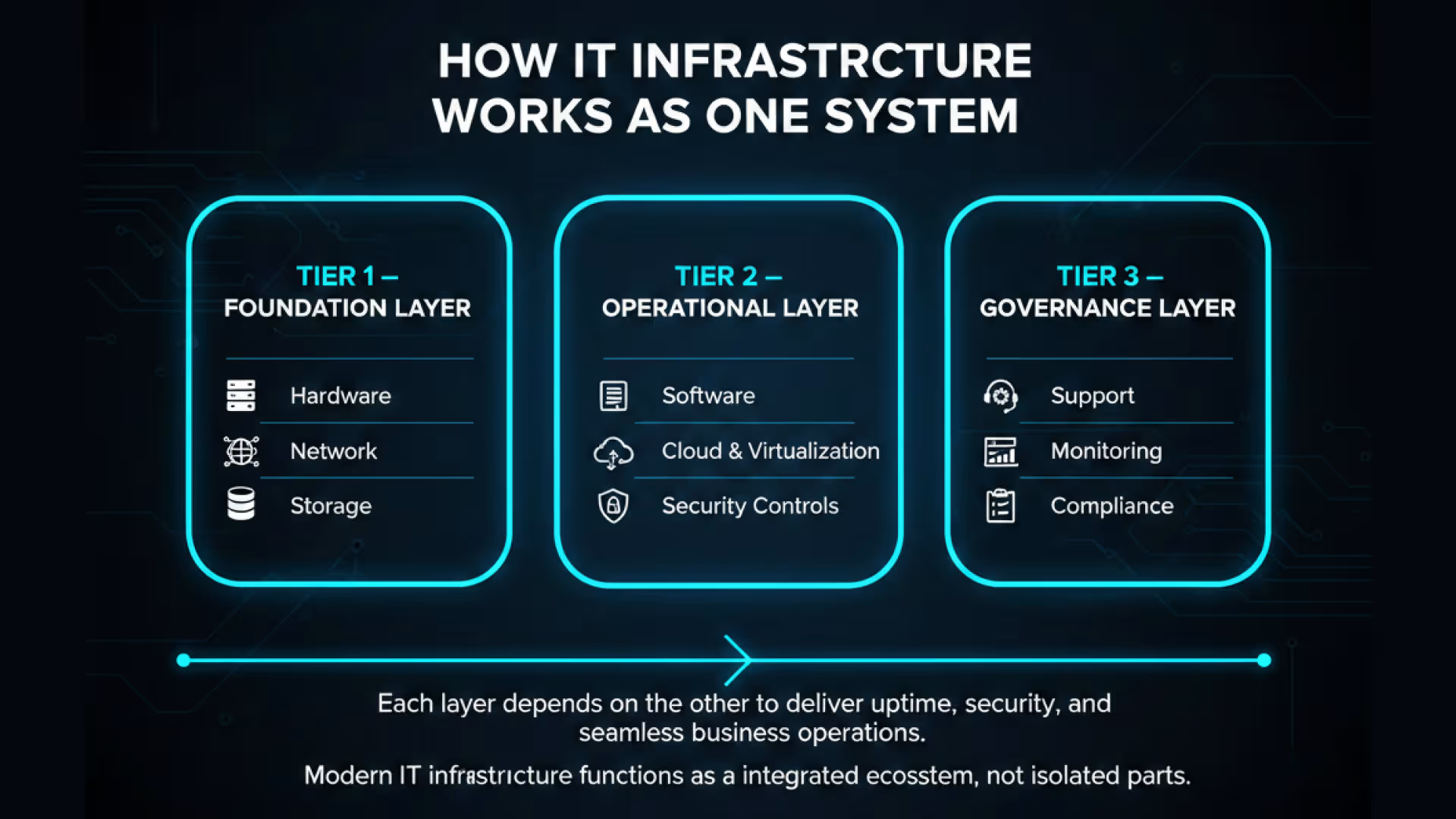
key components of IT infrastructure management

IT Service Management People and Processes

Technology does not manage itself. IT service management represents the people and processes responsible for operating the infrastructure. This includes service desks, incident response, change management, disaster recovery planning, and ongoing optimization.

Well defined processes reduce downtime and confusion during incidents. Clear ownership ensures accountability. For decision makers, this component often determines whether infrastructure investments deliver long term value or degrade over time.

Management Focus Areas That Sustain Infrastructure Performance

1. Monitoring and Maintenance

Continuous monitoring is a cornerstone of IT infrastructure management. Proactive checks identify issues before they affect users. Performance metrics provide insight into capacity trends. Preventive maintenance reduces the likelihood of unplanned outages.

Organizations that invest in monitoring gain predictability. They can plan upgrades, allocate budgets, and support growth with fewer disruptions.

2. Security and Business Continuity

Infrastructure resilience depends on preparation. Business continuity planning ensures systems can recover from failures, cyber incidents, or natural disruptions. Backup and recovery processes are tested regularly. Failover mechanisms are documented and understood.

This focus area highlights the role of IT infrastructure management in protecting revenue and operations during unexpected events.

3. Automation and Intelligent Operations

Automation reduces manual effort and improves consistency across infrastructure tasks. Routine activities such as provisioning, patching, and configuration management can be automated to reduce error and response time.

Many organizations are now introducing AI in IT infrastructure management. AI driven tools analyze logs, detect anomalies, predict capacity needs, and prioritize incidents. This does not replace human oversight. It augments decision making and allows IT teams to focus on higher value initiatives.

4. The Strategic Role of IT Infrastructure Management

For business leaders, the role of IT infrastructure management extends beyond uptime. It supports scalability, compliance, and innovation. Infrastructure decisions affect how quickly new services can be launched, how securely data is handled, and how efficiently teams collaborate.

When infrastructure is managed as a cohesive system, organizations gain control. They reduce technical debt. They improve planning accuracy. They align technology investments with business priorities.

This strategic role becomes even more important as organizations adopt automation, integrate external partners, and rely on data driven decision making.

Why Organizations Partner With Aryabh Consulting

Aryabh Consulting Inc. approaches IT infrastructure management as a long term enterprise responsibility rather than a one time implementation. Our focus is on building user centric, scalable systems that support real business operations.

As an authoritative enterprise software management provider, Aryabh Consulting helps organizations design, manage, and optimize infrastructure across hardware, software, cloud, and security layers. We emphasize clarity, governance, and operational discipline.

What differentiates our approach is post care. We provide ongoing monitoring and optimization, long term support, and SLA driven maintenance. Infrastructure environments evolve. Our engagement model ensures systems continue to perform as business needs change.

For decision makers seeking a reliable enterprise partner, Aryabh Consulting delivers structure, accountability, and sustained value.

Frequently Asked Questions

1. What is IT infrastructure management in simple terms

IT infrastructure management is the practice of managing the hardware, software, networks, data, and cloud systems that support daily business operations. It ensures these components work together reliably, securely, and efficiently.

2. Why is IT infrastructure management important for decision makers

For decision makers, IT infrastructure management reduces operational risk, improves system availability, and provides better cost control. It directly supports business continuity, compliance, and long term scalability.

3. What is the role of IT infrastructure management in business growth

The role of IT infrastructure management is to create a stable foundation that allows organizations to scale operations, adopt new technologies, and respond quickly to market changes without disruption.

4. How does AI help in IT infrastructure management

AI in IT infrastructure management helps analyze system data, detect anomalies, predict capacity needs, and prioritize incidents. It improves visibility and decision making while reducing manual effort.

5. What are the biggest challenges in managing IT infrastructure

Common challenges include legacy systems, limited visibility, security risks, rising cloud costs, and reactive maintenance. These issues often arise when infrastructure lacks standardization and continuous oversight.

6. How does ongoing monitoring and support improve infrastructure performance

Ongoing monitoring and SLA driven support help identify issues early, optimize performance, and maintain system reliability over time. Continuous optimization ensures infrastructure continues to align with evolving business needs.
This article is intended solely as a technical overview based on our insights and understanding of current technology trends. It does not promote, endorse, or represent any specific company, product, or individual. The content is purely informational and reflects our independent perspective on the subject.
1

Related Blogs

How Remote IT Infrastructure Management Prevents Downtime Before It Happens
Remote IT Infrastructure Management

How Remote IT Infrastructure Management Prevents Downtime Before It Happens

By Admin 8 min Read

In today’s always-on business environment, even a few minutes of IT downtime can bring operations to a halt, erode customer trust, and trigger costly ripple effects. For US businesses, the stakes are high—industry reports estimate downtime costs at $300,000 per hour or more, with the impact magnified in sectors like finance, healthcare, and e-commerce. Yet many organizations still take a reactive stance—scrambling to fix issues only after they’ve caused disruption. At Aryabh Consulting Inc. (ACI), we believe the smarter approach is to anticipate and resolve problems before they affect your business. This is the value of Remote IT Infrastructure Management —a proactive, data-driven strategy designed to keep your systems stable, secure, and available. The Real Cost of Downtime Downtime is more than a technical hiccup—it’s an operational, financial, and reputational threat. For startups, it can slow market entry and undermine investor confidence. For established enterprises, it can mean: Revenue loss from halted sales or disrupted service delivery. Missed project deadlines, resulting in penalties or lost contracts. Escalating IT support costs as teams work under urgent conditions. Data risks if systems fail mid-process. ACI’s remote management solutions focus on early detection and preventive action, minimizing the chance of disruption while ensuring compliance and operational continuity. Common Causes of System Downtime Understanding why downtime happens is critical to preventing it. The most common causes include: 1. Hardware Failures From aging servers to failing power supplies, hardware issues are predictable but often overlooked. At ACI, our remote systems track performance metrics like disk health and CPU temperatures to identify components approaching failure. 2. Software Issues Unpatched applications, incompatible updates, or misconfigurations can cause cascading outages. Our teams test and validate patches remotely before deployment to production environments, reducing the risk of instability. 3. Human Error Mistakes such as accidental deletions or incorrect commands are among the top causes of downtime. ACI’s infrastructure management integrates role-based access control and automated workflows to reduce manual error. 4. External Factors Cyberattacks, power outages, and natural disasters are unpredictable. We build geographic redundancy and automated failover into infrastructure strategies to protect operations when the unexpected happens. Blockchain: Enforcing Trust, Immutability, and Consent While Python enables flexible, secure infrastructure, blockchain delivers what traditional databases cannot: tamper-proof records and decentralized trust. 1. Immutable Audit Trails On permissioned blockchains like Hyperledger Fabric, every data-sharing event, PHI access, or user action is recorded as an immutable ledger entry—permanently time-stamped and cryptographically signed. This guarantees: Proof of compliance Zero risk of retroactive tampering Accountability across providers, insurers, and auditors 2. Smart Contracts for Consent Management Using smart contracts, we help insurers implement dynamic consent models where patients can grant, limit, or revoke PHI access with full transparency. Access is: Blocked unless consent terms are met Logged on-chain for regulatory reporting Auditable by both provider and patient in real-time 3. Decentralized Identity Verification Self-sovereign identity systems built on blockchain, when integrated with biometrics or MFA, reduce the risk of credential compromise. Insurers gain: Secure multi-party verification without central databases Frictionless onboarding and access control for both patients and providers Minimizing Planned Downtime Not all downtime is unplanned—system upgrades, security updates, and infrastructure migrations require deliberate pauses. ACI’s approach reduces their impact by: Scheduling maintenance during low-traffic periods based on analytics. Automating repetitive processes to shorten service windows. Communicating proactively with stakeholders to avoid surprises. Preventing Unplanned Downtime with Proactive Remote IT Management Where planned downtime is predictable, unplanned downtime is where losses escalate quickly. ACI uses proven strategies to keep your business online: Regular Updates & Patching Automated patching addresses vulnerabilities immediately, without waiting for manual intervention. Employee Awareness & Training We work with clients to establish protocols and train teams to recognize and report risks before they escalate. Automated Monitoring & Alerts Our systems analyze real-time performance data and trigger alerts for unusual activity, enabling rapid response before an outage occurs. Proactive Hardware Maintenance We identify components nearing failure and schedule replacements proactively—before they impact performance. Disaster Recovery Readiness ACI designs tested disaster recovery plans, incorporating off-site backups, redundancy, and fast failover to ensure business continuity. Measuring the Effectiveness of Downtime Prevention Prevention isn’t guesswork—it’s measurable. At ACI, we track key performance indicators, including: Mean Time Between Failures (MTBF) – Increasing operational lifespan. Mean Time to Repair (MTTR) – Minimizing recovery duration. Incident Frequency – Reducing the number of disruptions over time. These metrics allow us to refine strategies, align with business objectives, and demonstrate ROI for IT investments. Why Businesses Across the USA Choose ACI for Remote IT Infrastructure Management In a market where customers expect 24/7 access, preventing downtime is a competitive necessity. ACI’s US-based clients—from fast-moving startups to established enterprises—choose us because we: Deliver predictive monitoring and preventive maintenance. Free internal teams to focus on innovation rather than crisis response. Build scalable, secure infrastructure strategies tailored to industry and compliance needs. Downtime prevention is not just about reacting faster—it’s about removing the causes before they can interrupt your operations. With Aryabh Consulting Inc. as your remote infrastructure partner, you gain a resilient, high-performance IT environment that keeps your business moving forward—no matter what challenges arise. Let’s Talk Compliance That Scales In today’s competitive, always-on economy, preventing downtime is essential to safeguarding revenue, productivity, and customer trust. Remote IT Infrastructure Management (RIIM) from Aryabh Consulting Inc. delivers a proactive, data-driven approach that identifies and resolves risks before they disrupt operations. By combining predictive monitoring, automated maintenance, robust disaster recovery, and employee training, ACI ensures systems remain secure, stable, and available. This not only reduces costly outages but also frees internal teams to focus on growth and innovation. With ACI as your trusted partner, your business gains a resilient, future-ready IT environment designed to perform seamlessly—no matter the challenges ahead. We love to hear from you Contact Us

How Edge Computing Solves the Latency Problem for Modern Businesses
Remote IT Infrastructure Management

How Edge Computing Solves the Latency Problem for Modern Businesses

By Aryabh Consulting Inc. 7 min Read

In today’s digital-first economy, every millisecond matters. From banking transactions and healthcare diagnostics to logistics tracking and video conferencing, businesses depend on instant access to data. Yet, many organizations still struggle with latency—the frustrating delay between a user’s action and a system’s response. While traditional cloud computing has transformed the way companies store and process information, it comes with a hidden challenge: centralization. When all data is routed through a few large data centers, the distance between users and servers creates lag. Edge computing is designed to solve exactly this problem, ensuring faster, more reliable digital experiences. Understanding Latency: The Hidden Cost of Centralized Systems Latency is the round-trip time it takes for data to travel from a user’s device to a server and back. Even small delays can have significant consequences: Healthcare: Delays in accessing medical records or diagnostic images can postpone patient care. Finance: Extra seconds in transaction processing reduce competitiveness in high-frequency trading or mobile banking. logistics: Latency in shipment tracking can create blind spots in supply chain visibility. Customer Service: Slow-loading apps frustrate users, leading to churn and lost revenue. Centralized cloud systems, often located far from end users, are prone to this problem. The further away the data center, the longer the delay. Network congestion, VPN overhead, and bandwidth limitations compound the issue. What Edge Computing Really Is A common misconception is that edge computing means installing on-premise servers at every office or facility. In reality, edge computing is a cloud-enabled service provided by major cloud providers. Here’s how it works: A company’s core data resides in its primary cloud server. When employees or customers in another region access this data, latency occurs because of distance. Cloud providers automatically replicate the required data and store it temporarily on servers closer to the user—these are called edge nodes. The user interacts with the edge node at much lower latency. When the session ends, the temporary data is synchronized back to the main server and then deleted from the edge location. This architecture brings the cloud closer to the user while maintaining central control, ensuring speed without compromising data integrity. How Edge Computing Solves the Delay Problem 1. Faster Access to Data By caching or replicating information at edge nodes, businesses cut down the physical distance data has to travel. This accelerates: Loading times for business applications. Retrieval of documents, records, and reports. Real-time collaboration across distributed teams. 2. Real-Time Decision Making Industries that depend on instant insights—such as healthcare diagnostics, fraud detection, or IoT monitoring—benefit immensely. For example, a diagnostic imaging platform can deliver results faster when edge servers handle requests locally before syncing with the main cloud. 3. Improved Reliability If the central cloud experiences downtime, edge nodes can continue to serve localized requests, ensuring business continuity. This reduces the risk of total service outages during cloud disruptions. 4. Enhanced User Experience Edge-enabled applications feel seamless to users. Whether it’s telehealth consultations, banking transactions, or e-commerce checkouts, reduced latency leads to smoother interactions and higher satisfaction. Security and Compliance in Edge Computing One of the biggest concerns with temporary data replication is security. Cloud providers address this with strong encryption, strict access controls, and compliance frameworks. Data Encryption: Information cached at edge nodes remains encrypted at rest and in transit. Session-Based Storage: Data is deleted once the session ends, reducing risk of exposure. Compliance Support: Leading edge providers meet regulatory standards such as HIPAA for healthcare and PCI-DSS for financial transactions. This ensures organizations can leverage edge computing without sacrificing compliance or patient/customer trust. Business Scenarios Where Edge Delivers Immediate Value Healthcare: Telehealth platforms become more reliable as consultations run smoothly even during peak usage. Remote monitoring devices transmit patient data with minimal lag. Finance: Banks can reduce latency in mobile transactions, ensuring faster and more secure transfers. Fraud detection systems flag anomalies in near real-time. Retail and E-Commerce: Online stores deliver faster checkout experiences, and inventory systems update instantly across multiple locations. Logistics and Transportation: Shipment tracking and fleet management platforms update location and status in real time, enabling agile decision-making. Media and Entertainment: Video streaming platforms minimize buffering by serving content directly from local edge nodes. The Role of Aryabh Consulting Edge computing is not a one-size-fits-all solution. Every business has unique workflows, compliance requirements, and performance needs. That’s why the implementation process must be carefully designed. “Aryabh Consulting partners with the right providers to offer solutions that best fit customers’ needs.” Frequently Asked Questions 1. How is edge computing different from traditional cloud? Traditional cloud centralizes data in large data centers. Edge computing replicates data closer to users, reducing latency while syncing back to the main server. 2. Does edge computing require on-premise servers? No. Edge services are managed by cloud providers, eliminating the need for organizations to maintain their own physical servers. 3. How does edge computing improve business performance? By reducing latency, edge computing enables faster access to data, more reliable applications, and real-time decision-making. 4. Is temporary replication at edge nodes secure? Yes. Leading providers use encryption, compliance frameworks, and automatic data deletion after sessions to maintain security and privacy. 5. Which industries benefit most from edge computing? Healthcare, finance, logistics, retail, and media are key sectors where reduced latency directly impacts outcomes and customer satisfaction. Preparing for the Future of Business IT The modern business landscape demands speed, reliability, and resilience. Latency is no longer a minor inconvenience; it directly impacts revenue, efficiency, and customer trust. Edge computing solves this by intelligently bringing data closer to users, while still integrating seamlessly with the cloud. Organizations that adopt edge-cloud architectures today will be better equipped to handle tomorrow’s digital challenges—whether it’s scaling telehealth, securing real-time payments, or delivering global services at local speeds. We love to hear from you Contact Us

9 Remote IT Support Tools Every SMB Should Know: Features, Use Cases, and Best Practices
Remote IT Infrastructure Management

9 Remote IT Support Tools Every SMB Should Know: Features, Use Cases, and Best Practices

By Admin 6 min Read

Why Remote IT Support Matters for SMBs Running a small or mid-sized business (SMB) means wearing multiple hats. When technology breaks or users need help, downtime can cost clients and credibility. Today, remote IT support tools empower SMBs to solve problems quickly, control costs, and compete with bigger players. This article shares nine essential tools, guiding you through how they work, their unique strengths, and how to pick solutions fit for growing teams. Small businesses are expected to move fast—but keeping systems up and running is not always easy. Remote IT support allows help-desk specialists and tech managers to fix devices, install software, and train users from anywhere, reducing costs and making support scalable. No more waiting for onsite visits or dealing with expensive service calls; remote tools unlock productivity—and peace of mind—for SMBs. The Top 9 Tools: How They Work and Key Features 1. TeamViewer How it works: Install on both technician and user devices for secure remote access. Features: File transfer, remote printing, session recording, cross-platform support (Windows, Mac, Linux, iOS, Android). Why SMBs love it: Security meets flexibility; perfect for businesses with distributed teams or remote staff. 2. AnyDesk How it works: Lightweight software connects computers instantly with minimal lag. Features: Session recording, remote printing, simple UI, runs smoothly on modest hardware. Best for: Small offices, freelancers, shops needing quick, reliable access. 3. LogMeIn How it works: Provides full remote desktop access plus advanced analytics and monitoring. Features: Enterprise-grade encryption, multi-monitor support, unattended access, reporting tools. Pros: Excellent reliability and support; consider it for SMBs with compliance needs or sensitive data. 4. Splashtop How it works: Fast, HD remote access suitable for graphic-intense roles and creative teams. Features: Session recording, support for multiple devices, affordable pricing. Best fit: Agencies, designers, retail businesses wanting good performance without breaking the bank. 5. Zoho Assist How it works: Web-based tool supports direct device connections, even from mobile. Features: Unattended access, custom branding, integrations with Zoho’s suite. Why SMBs choose it: Easy setup and solid free tier—great for startups managing multiple tasks. 6. ConnectWise Control How it works: Allows multiple technicians to collaborate on live troubleshooting and support. Features: Automation for recurring issues, session recording, user management. Best for: Small IT providers or growing SMBs with distributed tech teams needing collaboration. 7. BeyondTrust How it works: Offers top-tier security with privilege management and audit logs. Features: Compliance tools, granular user controls, integration with help desks. When to recommend: Healthcare, legal, finance SMBs or any business handling sensitive data. 8. RemotePC How it works: Simple remote desktop solution with drag-and-drop file sharing. Features: Browser support (no install required!), intuitive design, budget pricing. Best fit: SMBs with limited resources or who want rapid deployment. 9. Dameware How it works: Combines remote support with user administration for larger SMBs or those planning to expand. Features: Remote management, scalability, mobile access. Pros: Ideal for tech managers serving multiple locations or rapid-growth companies. Choosing the Right Remote Support Tool for SMBs Security: Look for tools offering end-to-end encryption and two-factor authentication. This is non-negotiable if you store client data or financial records. Ease of Use: Tools with intuitive interfaces are easier for employees and freelancers to adopt, reducing calls for support. Scalability: As your business grows, choose software that scales—adding devices or locations should be painless. Compliance Support: Regulated fields (health, legal, finance) need auditing, logging, and privilege management. Tools like BeyondTrust and LogMeIn excel here. Mobile Compatibility: Supporting tablets and smartphones allows for more flexible support—ideal for field teams. Actionable Best Practices for SMB IT Support Proactive monitoring: Pick a tool with built-in alerts or monitoring. Catching problems before they cascade saves time and money. Training and documentation: Create a knowledge base for common fixes—remote tools often allow session recording for training future staff. Feedback loops: After helping an employee or customer, ask for a rating or review. This improves future support and helps identify bottlenecks. Integrate with ticketing/help desk systems: Streamlining support requests makes every remote session more efficient. Real-World Case Study: Remote Support in a Small Business A growing retail chain with five locations saw recurring tech headaches—register crashes, printer woes, software updates. By adopting Splashtop and Zoho Assist, their IT manager troubleshot problems from home, reducing downtime by 70% and improving employee satisfaction overnight. This case isn’t unique: with the right tool, any SMB gains back control and valuable business hours. Common Problems Solved by Remote Support Tools Device configuration and updates Software installation and troubleshooting Virus/malware removal Password recovery Printer and network fixes Employee training and onboarding Remote support tools handle these tasks swiftly—without expensive, slow site visits or third-party service calls. When to Switch from DIY Support to Pro Remote Services As an SMB grows, IT problems get more complex. If tech issues are distracting your team, disrupting service, or threatening sensitive data, the cost of downtime may exceed the price of professional help. That’s where expert remote support—integrated with compliance protocols and tailored for small businesses—can be a game-changer. Aryabh Consulting: Remote IT Solutions for Growth-Focused SMBs Aryabh Consulting Inc. delivers remote IT services built on best practices from leading industries, designed for the security, uptime, and flexibility SMBs need. Whether facing compliance requirements, scaling operations, or needing after-hours support, our experts are ready to solve your business’s toughest IT problems—remotely and reliably. We love to hear from you Contact Us

Cloud Infrastructure Management: Components, Best Practices, Tools & Challenges
Remote IT Infrastructure Management

Cloud Infrastructure Management: Components, Best Practices, Tools & Challenges

By ACI 6 min Read

In today’s digital era, businesses rely heavily on cloud computing to host their data, applications, and critical services. Cloud Infrastructure Management (CIM) plays a vital role in ensuring that these cloud environments run smoothly, securely, and efficiently. It involves overseeing and optimizing servers, storage, networks, and virtual resources that make up your cloud ecosystem. Proper management helps businesses scale faster, enhance security, reduce downtime, and control costs — all while maintaining high performance. In this blog, we’ll explore what cloud infrastructure management is, its key components, best practices, challenges, and the top tools that can help you streamline operations. What Is Cloud Infrastructure Management & Why It’s Important? What Is Cloud Infrastructure Management? Cloud Infrastructure Management refers to the systematic process of monitoring, controlling, and optimizing cloud-based resources such as servers, networks, databases, and storage systems. Platforms like Amazon Web Services (AWS), Microsoft Azure, and Google Cloud Platform (GCP) provide these infrastructure components that businesses can manage and scale as needed. Unlike traditional on-premise infrastructure, CIM provides on-demand scalability, automation, and global availability — allowing organizations to meet fluctuating workloads with ease. Why Is Cloud Infrastructure Management Important for Modern Businesses? Modern enterprises depend on the cloud for critical workloads, which makes effective management essential for: Scalability: Dynamically adjust resources based on usage demand. Automation: Reduce manual tasks with automated provisioning and monitoring. Uptime & Reliability: Minimize downtime and ensure business continuity. Data Security: Maintain compliance and protect sensitive data from breaches. Benefits of Cloud Infrastructure Management: Enhanced performance and flexibility Cost control through efficient resource allocation Centralized visibility across multi-cloud environments Faster deployment cycles Core Components of Cloud Infrastructure Cloud infrastructure consists of multiple integrated components that power cloud operations: 1. Compute: Virtual machines (VMs), containers, and serverless functions form the computational backbone. Platforms like AWS EC2, Google Compute Engine, and Docker provide scalable compute resources 2. Storage: Cloud storage comes in three main types: Object Storage: Ideal for large unstructured data (e.g., Amazon S3). Cannot easily share patient data outside the organization. Less effective for population health management. 3. Networking: Virtual networks, firewalls, and load balancers ensure secure, fast communication between services and users. 4. Cloud Services & Tools: Monitoring, automation, and security layers — such as CloudWatch, Azure Monitor, and Kubernetes — streamline management and performance optimization. Key Aspects of Cloud Infrastructure Management Effective cloud infrastructure management revolves around several critical aspects: Resource Provisioning: Allocating compute, storage, and network resources as per demand. Automation & Orchestration: Automating workflows using IaC tools like Terraform and Ansible. Security & Compliance: Implementing firewalls, encryption, and compliance standards such as ISO, SOC 2, and GDPR. Monitoring & Performance Tracking: Using real-time analytics to detect and fix issues proactively. Cost Optimization & Budgeting: Tracking usage to prevent over-provisioning and reduce cloud spend. Best Practices for Effective Cloud Infrastructure Management To ensure seamless cloud performance and control, follow these proven best practices: Implement Infrastructure as Code (IaC): Tools like Terraform and AWS CloudFormation enable scalable, repeatable setups. Use Automated Monitoring & Alerts: Set up continuous performance checks with Datadog, New Relic, or Prometheus. Adopt Multi-Cloud or Hybrid Strategies: Avoid vendor lock-in and improve redundancy. Ensure Continuous Security Compliance: Regular audits and vulnerability assessments protect data integrity. Conduct Regular Cost Audits: Evaluate your resource usage monthly to eliminate waste and optimize billing. Common Challenges in Cloud Infrastructure Management While cloud computing offers immense benefits, it also brings unique challenges: Challenge Description Solution Cost Overruns Uncontrolled scaling can lead to budget overflow. Use budgeting tools and set spending alerts. Data Security Vulnerabilities Misconfigurations may expose data. Apply encryption and role-based access control. Lack of Visibility Managing multi-cloud setups can obscure resource usage. Implement centralized dashboards for visibility. Compliance Complexity Global standards like GDPR require strict controls. Use compliance automation frameworks. Downtime or Latency Issues Poorly optimized workloads can cause Deploy load balancers and use distributed zones. Addressing these challenges early ensures smooth cloud operations and stronger resilience. Technologies & Tools Used in Cloud Infrastructure Management Cloud management tools play a vital role in automation, monitoring, and optimization. Infrastructure as Code (IaC): Terraform AWS CloudFormation Pulumi Monitoring & Observability: Datadog New Relic Prometheus AWS CloudWatch Automation & Orchestration: Kubernetes Docker Ansible Cost Optimization & Governance: CloudHealth by VMware Spot.io Azure Cost Management These tools collectively simplify infrastructure deployment, enhance performance, and reduce operational overhead. Conclusion Effective Cloud Infrastructure Management ensures that your cloud ecosystem remains secure, cost-effective, and high-performing. By leveraging automation, adopting best practices, and using the right tools, organizations can maintain scalability and compliance effortlessly. If you’re looking to optimize your business’s cloud infrastructure, consider partnering with a professional cloud management team to unlock higher efficiency and growth. We love to hear from you Contact Us

The Role of Cloud Services in Building Secure, Scalable Enterprise Platforms
Remote IT Infrastructure Management

The Role of Cloud Services in Building Secure, Scalable Enterprise Platforms

By Admin 6 min Read

Enterprises today face growing pressure to manage data securely and operate efficiently while adapting to rapid changes in technology and market demands. Traditional IT systems can no longer support these needs because they are expensive, inflexible, and difficult to scale. Cloud services for enterprises have become the foundation for modern enterprise platforms. They combine strong security frameworks with flexible resource management, allowing organizations to protect their data and scale operations without disruption. Cloud adoption is now an essential part of enterprise growth and digital transformation. Why Cloud Services Are Essential for Modern Enterprises Cloud technology supports enterprise agility and continuity. It allows companies to move away from physical data centers and toward a more adaptive, software-driven infrastructure. This approach improves flexibility and reduces downtime. It also gives enterprises better control over data, faster deployment of new solutions, and the ability to operate securely across multiple regions. Studies from leading research firms show that most large organizations are now following a cloud-first approach to stay competitive. By using cloud architecture, enterprises gain the ability to deliver consistent performance, reduce maintenance, and adapt quickly to new business models. The result is a system that grows with the organization while keeping data safe and compliant. Security in Cloud Architecture Security is one of the most important factors in enterprise cloud design. Modern cloud environments provide multiple layers of protection for data, networks, and applications. 1. Centralized Security Management Cloud management tools give IT teams a single view of all resources. This helps them detect issues early, monitor performance, and respond quickly to potential threats. 2. Identity and Access Management Role-based access control and multi-factor authentication limit data access to authorized users only. This reduces the risk of insider threats and unauthorized entry. 3. Security as a Service Cloud providers such as AWS, Azure, and Google Cloud include built-in security tools. These tools use automation and artificial intelligence to detect unusual behavior, manage compliance, and ensure data protection according to frameworks such as HIPAA Compliance and GDPR. 4. Encryption and Auditing Cloud environments encrypt data both when it is stored and when it is transmitted. Regular auditing and automated compliance checks ensure that enterprise systems meet industry standards and maintain reliability. Together, these measures create a secure structure that helps enterprises protect sensitive information and maintain trust across all operations. Scalability and Performance in Cloud Platforms Scalability is a core strength of cloud systems. Enterprises can adjust computing power and storage as needed without investing in new hardware or data centers. 1. Auto-Scaling and Load Balancing Cloud services automatically add or reduce computing resources based on demand. Load balancing ensures that user traffic is distributed evenly, keeping applications fast and reliable. 2. Containerization and Infrastructure as Code Technologies such as Kubernetes and Terraform automate the setup and deployment of infrastructure. They make scaling faster, reduce human error, and allow teams to manage systems consistently across different environments. 3. Elastic Resource Use Cloud scalability supports predictable spending. Companies pay only for the resources they use, which reduces waste and allows them to plan technology investments more effectively. These features help enterprises maintain performance and flexibility while keeping costs under control. Business Benefits of Cloud-Based Enterprise Architecture Cloud-based systems offer clear operational and financial advantages. 1. Agility and Faster Delivery Teams can access tools, computing power, and applications whenever needed. This supports faster product development and quicker responses to market changes. 2. Improved Compliance and Security Major providers meet global compliance standards. Automated updates and built-in controls help organizations stay compliant without adding complexity to IT management. 3. Business Continuity and Disaster Recovery Cloud platforms include backup systems and failover support that reduce downtime during disruptions. This ensures that business operations remain available and data remains protected. 4. Cost Efficiency Enterprises can reduce capital expenses by moving from physical hardware to a subscription or pay-per-use model. This makes enterprise-grade systems more affordable and easier to scale as the business grows. These benefits create a reliable and adaptable technology foundation for modern organizations. The Future of Enterprise Cloud Platforms The future of enterprise platforms is moving toward intelligent and automated cloud operations. Artificial intelligence and predictive analytics are being integrated into cloud environments to monitor performance, optimize workloads, and enhance cybersecurity. Enterprises are also using multi-cloud and sovereign cloud models to meet local compliance rules while maintaining global reach. These models improve flexibility and give businesses more control over where and how their data is stored. Aryabh Consulting helps enterprises design and implement cloud architectures that are secure, efficient, and ready for future demands. Our team focuses on creating systems that balance performance with reliability and align with long-term business goals. Conclusion Cloud services give enterprises the ability to build platforms that are secure, scalable, and ready for continuous growth. They reduce operational risk, simplify compliance, and support global collaboration. Organizations that invest in well-designed cloud solutions today are better equipped to face tomorrow's challenges with confidence. Aryabh Consulting helps enterprises develop secure and scalable cloud ecosystems that strengthen resilience and support digital transformation. Let's Build Your Secure Cloud Infrastructure Aryabh Consulting offers comprehensive cloud transformation services specifically designed for enterprises seeking secure, scalable, and compliant cloud platforms. Whether you're planning a cloud migration, optimizing your existing infrastructure, or building new enterprise platforms, we bring the expertise and technical discipline to help you succeed. Contact us now to discover how we can help you leverage cloud services to build a more agile, secure, and future-ready enterprise. We love to hear from you Contact Us